Introduction
Device frames transform flat screenshots into believable, aspirational app previews. A screenshot inside an iPhone frame doesn't just show what your app looks like - it shows what it feels like to hold and use. That psychological shift is incredibly powerful for conversion.
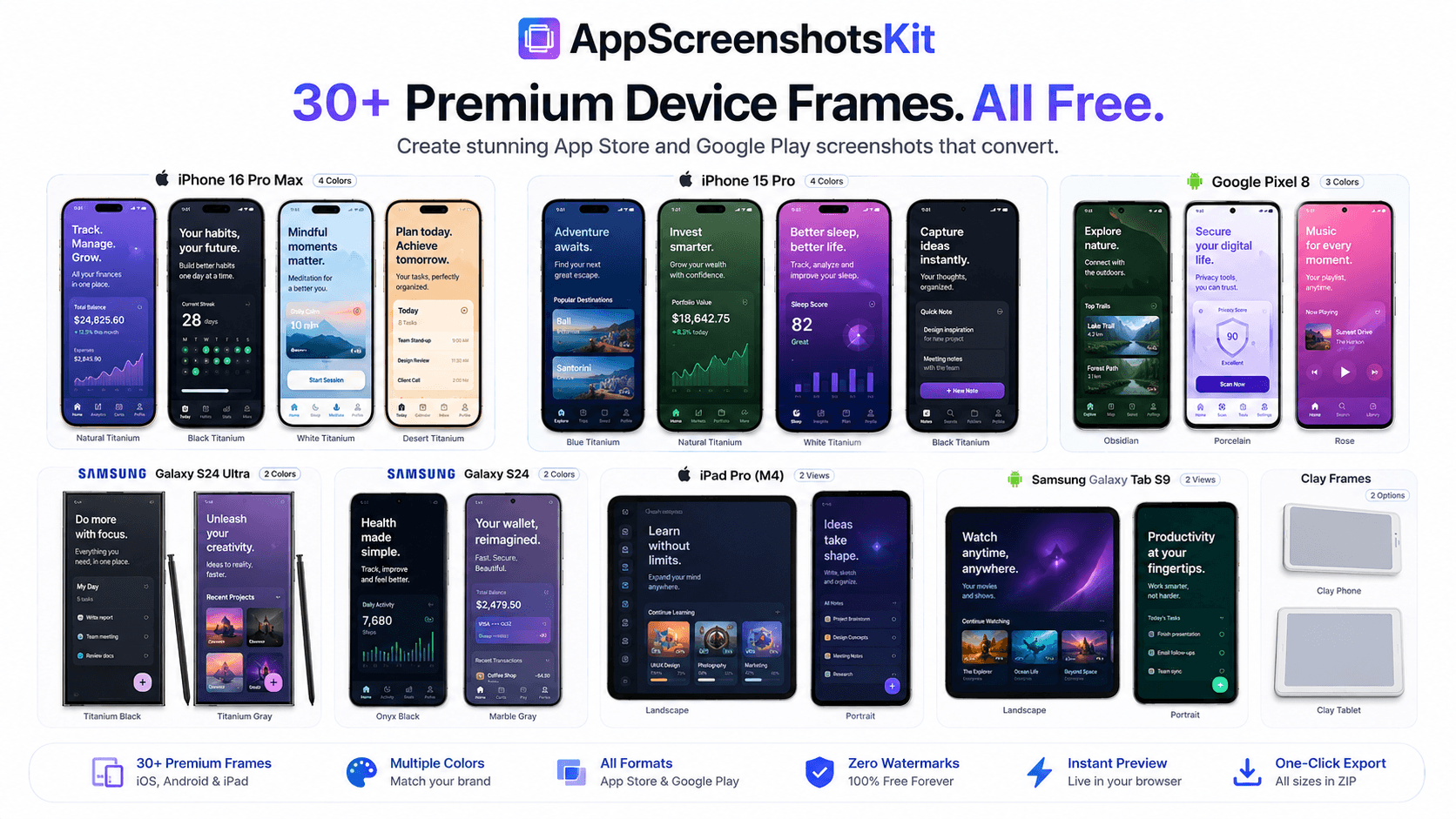
AppScreenshotsKit offers 30+ meticulously crafted device frames, completely free, covering every major platform and form factor your users care about.
The Full Device Frame Library
Here's a breakdown of what's available:
- iPhone 16 Pro Max - in Natural Titanium, Black Titanium, White Titanium, Desert Titanium
- iPhone 15 Pro - multiple colorways
- iPhone 14 and 13 - for backward compatibility screenshots
- iPad Pro M4 - portrait and landscape
- iPad Air - multiple sizes
- Google Pixel 8 - in Obsidian, Porcelain, Rose
- Samsung Galaxy S24 Ultra - Titanium Black and White
- Samsung Galaxy Tab - tablet form factor
- Clay device frames - minimalist, distraction-free
- Real-photo device frames - ultra-realistic product shots
Clay vs. Real Frames - Which Should You Choose?
Clay frames are smooth, monochrome 3D renders of devices. They keep the focus on your app's UI without the visual noise of camera lenses, buttons, or reflections. They're ideal for SaaS products, productivity apps, and minimalist designs.
Real frames are photo-realistic renders that look exactly like the physical device. They're perfect for consumer apps, games, and lifestyle products where authenticity and aspiration matter.
Pro Tip: Match Your Device Frame to Your Target Audience
If your app targets iOS users predominantly, lead with iPhone frames. If you're launching cross-platform, show both iOS and Android side by side. AppScreenshotsKit makes switching frames instant - no redesign required.
Why Device Frame Variety Matters for ASO
- App Store requires specific screenshot sizes per device type
- Google Play features phone AND tablet screenshots separately
- Different frame colors perform differently in A/B tests
- Showing multiple devices signals cross-platform support
- Device context increases perceived app quality
How to Switch Frames in Seconds
AppScreenshotsKit's interface lets you swap between all 30+ frames with a single click. Your screenshot, text overlay, and background all stay in place - only the frame changes. This makes A/B testing visual variants dramatically faster than any competing tool.
Conclusion
With 30+ device frames covering every major iOS and Android device, AppScreenshotsKit gives you the flexibility to create exactly the right visual context for your app - across every platform, for every audience. And unlike paid tools, every frame is available on the free plan, with zero watermarks.
Try all 30+ device frames free - AppScreenshotsKit.com
Open Editor Free